
Linux – Laptop

Linux Liberty Laptop

To ensure your protection while using the Linux LibertyLaptop, Calix Solutions configures the system to prevent any unauthorized or hidden transmission of your data. We strengthen security settings and optimize the laptop’s performance for secure operations. Each device includes an added layer of encryption to make unauthorized access even more difficult. Calix Solutions also ensures that no transaction history is stored on your device, and no cloud services are used—keeping your information fully local and fully private.

Product Features

$1,775.00

Personalize Your LibertyLaptop™

Description

How the Linux LibertyLaptop Works

When you receive your Linux LibertyLaptop, Calix Solutions walks you through the setup so you can browse the internet with confidence and anonymity. During that initial setup, we help you create an encrypted email account, choose a VPN service, set up an external backup option, and take care of a few other essentials to make sure you’re fully protected from Day One.

From the moment you power it on, your Linux LibertyLaptop is already working on your behalf. As it loads, it automatically runs a system‑wide security sync to make sure everything is locked down and up to date. At the start of each session, all you need to do is turn on your VPN and pick your preferred location. You can also choose to run a system clean‑up at the beginning of each session for an extra layer of privacy and peace of mind.

Calix Solutions is committed to making each experience on the internet a safer one. Feel free to email us with any questions at [email protected]
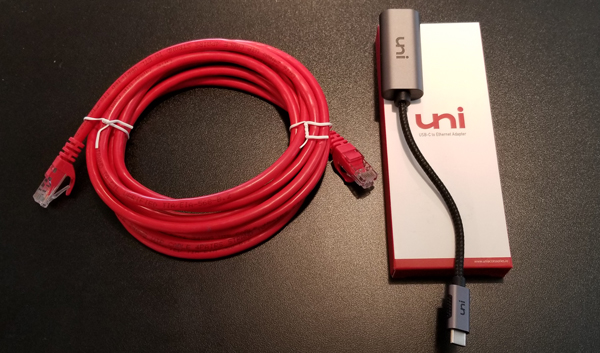
CAT6 Ethernet Package

The CAT6 Ethernet Package will allow you to plug your LibertyLaptop™ into your modem/router for additional security. Making that connection will provide you with an undetected path to the Internet.

The CAT6 Ethernet Package contains a 10 foot CAT 6 ethernet cable and a USB adaptor that connects to your laptop. The PC will require a USB-A adaptor while the Mac needs the USB-C adaptor.